




Selecting a Feed Amount Adjustment Method (Feed Priority) (iPF6300S)
Solution
Methods of adjusting the amount paper that is fed are set in [Adj.Priority].
Adjust [Adj.Priority] to suit your particular printing application.
- [Print Quality] : Adjusts the feed amount to reduce banding across the sheet in printed documents.
[Adj.Quality] settings are applied. When [Adj.Fine Feed] is executed, the [Adj.Fine Feed] settings are applied in addition to the [Adj.Quality] settings.
- [Print Length] : Adjusts the feed amount for better accuracy of lines in printed documents.
The settings of [A:High] or [B:Standard/Draft] in [Adjust Length] are applied.
- [Automatic] : [Print Quality] or [Print Length] is selected, depending on [Print Priority] as selected in the printer driver at the time of printing.
[Image] or [Office Document] : [Print Quality] is selected.
[Line Drawing/Text] : [Print Length] is selected.
NOTE
- Either [A:High] or [B:Standard/Draft] in the [Adjust Length] menu is applied, depending on printer driver settings at the time of printing.
- If you have selected [Easy Settings] in the printer driver, follow these steps to confirm the [Print Priority] setting.
-Windows: Click [View Settings] on the [Main] tab to display the [View Settings] dialog box.
-Mac OS X: Click [View set.] on the [Main] panel to display the [View settings] dialog box.
Follow these steps to configure the settings.
1.Load the paper.
2.On the [Tab Selection screen] of the Control Panel, press  or
or  to select the Settings/Adj. tab (
 ).
).
or to select the Settings/Adj. tab ().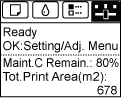
NOTE
- If the [Tab Selection screen] is not displayed, press the [Menu] button.
3.Press the [OK] button.
The [Set./Adj. Menu] is displayed.
4.Press  or
or  to select [Adjust Printer], and then press the [OK] button.
or to select [Adjust Printer], and then press the [OK] button. 5.Press or to select [Feed Priority], and then press the [OK] button.
or to select [Feed Priority], and then press the [OK] button. 6.Press or to select [Adj. Priority], and then press the [OK] button.
or to select [Adj. Priority], and then press the [OK] button. 7.Press or to select [Automatic], [Print Quality], or [Print Length], and then press the [OK] button.
or to select [Automatic], [Print Quality], or [Print Length], and then press the [OK] button.