





How do I add the date and time to my pictures?
Solution
These instructions explain how to insert the date in images.
CAUTION
- The [Date Stamp] cannot be deleted from the image data once it has been recorded because the date is written in as an image.
- In the following shooting modes, you cannot add a date to the images (Date Stamp).
- [Movie] ( ), [LowLight] (
 )
)
), [LowLight] ()1. Set  the <Mode Switch> to a setting other than [Movie] (), and press
  the <Power> button.
the <Mode Switch> to a setting other than [Movie] (), and press the <Power> button.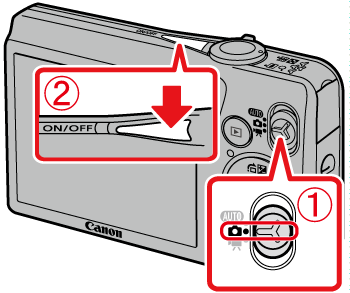
2. Press the <MENU> ( ) button.
) button.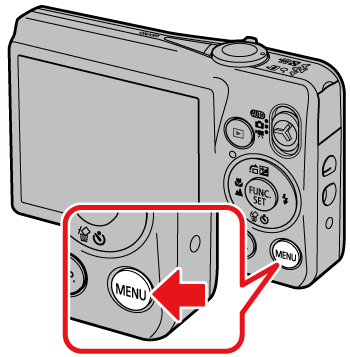
3. The following screen will appear on the LCD monitor.
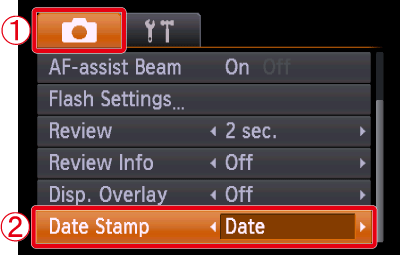
Operate the <directional button> to select the [Shooting] ( ) tab.
the [Shooting] () tab.Operate the <directional button> to set [Date Stamp] to [Date] or [Date & Time].
[Date Stamp] to [Date] or [Date & Time].After making these settings, press the <MENU> () button.
) button.4. If you set [Date Stamp], [DATE] will appear on the LCD monitor.

If [DATE] does not appear, press the <DISP.> ( ) button a few times to switch the screen display.
) button a few times to switch the screen display.5. When shooting with this setting, the date will be embedded in the image as shown below.
 [Date] [Date & Time]
WARNING
The date, its font and color, and the position where it is displayed cannot be changed. Also, dates and times recorded with [Date Stamp] cannot be deleted.