






Setting the Slow & Fast Motion Recording
Solution
You can record clips that have a slow motion or fast motion effect during playback, simply by selecting the desired slow/fast motion rate. Available slow/fast motion rates will vary depending on the resolution and frame rate currently selected. Sound is not recorded when slow & fast motion recording is activated.
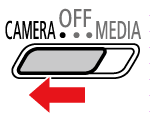
1. Set the power switch to CAMERA.
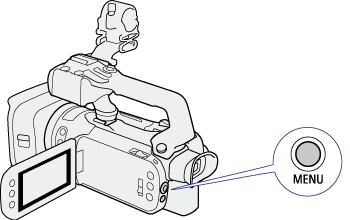
2. Press the MENU button.
3. Select [  Recording Setup] -> [Slow & Fast Motion].
Recording Setup] -> [Slow & Fast Motion].4. Select the desired slow & fast motion rate.

5. Select [  ].
].
].REFERENCE
- Select [
 ] to turn off slow & fast motion recording.
 -
 or
or  and the selected rate will appear on the right of the the screen.
- MP4 clips: Available slow/fast motion rates
| Resolution | Frame rate | Available slow/fast motion rates |
| 3840x2160 | 29.97P | x2, x4, x10, x20, x60, x120, x600, x1200 |
| 23.98P | x0.8 | |
| 1920x1080 | 59.94P | x2, x4, x10, x20, x60, x120, x600, x1200 |
| 29.97P | x0.5 | |
| 23.98P | x0.4, x0.8 | |
| 1280x720 | 59.94P | x2, x4, x10, x20, x60, x120, x600, x1200 |
- XF-AVC clips: Available slow/fast motion rates (
 and
and  only)
only)
| Resolution | Frame rate | Available slow/fast motion rates | Playback bit rate |
| 3840x2160 | 29.97P | x2, x4, x10, x20, x60, x120, x600, x1200 | 160 Mbps |
| 23.98P | x0.8 | 150 Mbps | |
| 1920x1080 | 59.94P | x2, x4, x10, x20, x60, x120, x600, x1200 | 45 Mbps |
| 29.97P | x0.5 | ||
| 23.98P | x0.4, x0.8 |
NOTE
- Slow & fast motion recording cannot be used together with the following functions.
- Dual recording
- Pre-recording
- Relay recording
- Color bars
- While slow & fast motion recording is activated, the recording command signal will not be output from the SDI OUT terminal ( only) or HDMI OUT terminal.
- About the time code when slow & fast motion recording is activated:
- The time code mode can be set to [  Regen.], or to [
  Preset] with [
  Rec Run] running mode.
Regen.], or to [ Preset] with [ Rec Run] running mode. - If the time code running mode was set to [  Free Run ], the time code running mode will be changed automatically to [ Rec Run ] when slow & fast motion recording is activated.
Free Run ], the time code running mode will be changed automatically to [ Rec Run ] when slow & fast motion recording is activated. - When slow & fast motion recording is turned off, the time code running mode will return to its previous setting.
- The time code signal cannot be output from the SDI OUT terminal ( only) or HDMI OUT terminal.
only) or HDMI OUT terminal.- The maximum continuous recording time of a single clip using slow motion recording is the equivalent of 6 hours of playback time. Recording will stop automatically after that. For example, when the [x0.5] rate is selected, the maximum continuous recording time will be 3 hours (which, played back at x0.5 slow motion, equal 6 hours of playback time). This restriction does not apply to fast motion recording, which will not stop automatically.