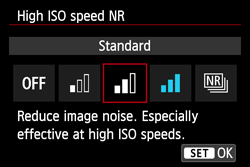




The effects of [High ISO speed noise reduction] on the number of possible shots for the maximum burst during continuous shooting (EOS M)
Solution
If the maximum burst is lower than the normal number, and the camera stops continuous shooting in mid-course, check the [High ISO Speed Noise Reduction] custom function setting.
If [High ISO Speed Noise Reduction] is set to [High] or [Multi Shot Noise Reduction], the number of continuous shots (maximum burst) will be lower. To reset the maximum burst to normal, select either [Standard], [Low], or [Disable] for [High ISO Speed Noise Reduction].
IMPORTANT
When the [High ISO speed noise reduction] setting is enabled, more time is required to process noise reduction. As a result, it will take longer to temporarily save data in the storage space, and the camera is more likely to be interrupted during continuous shooting.
1. To change the [High ISO Speed Noise Reduction] setting, display the menu screen and choose [High ISO speed NR] on the [  ] tab, then press <
  >.
>.
] tab, then press < >.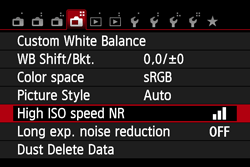
2. The [High ISO speed NR] screen will appear, select either [Standard], [Low], or [Disable] for [High ISO Speed Noise Reduction].
For more information, please refer to the camera's instruction manual.