






Locking Exposure and Shooting / AE Lock (EOS 7D Mark II)
Solution
Use AE lock when the area of focus is to be different from the exposure metering area or when you want to take multiple shots at the same exposure setting. Press the < > button to lock the exposure, then recompose and take the shot. This is called AE lock. It is effective for backlit subjects, etc.
> button to lock the exposure, then recompose and take the shot. This is called AE lock. It is effective for backlit subjects, etc.The setting procedure is explained below.
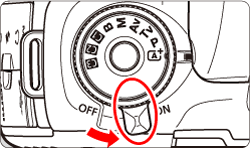
1. Set the camera's power switch to <ON>.
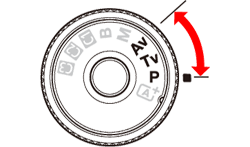
2. Set the Mode Dial to < P / Tv / Av >.
3. Press the shutter button halfway to focus on the subject.
4. Press the <> button.
> button.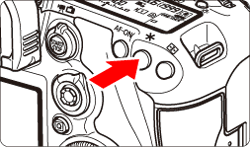
The <> icon lights up in the viewfinder to indicate that the exposure setting is locked (AE lock).
> icon lights up in the viewfinder to indicate that the exposure setting is locked (AE lock).NOTE
- <> remains active for 4 sec. after you let go of the button.
- Each time you press the <> button, the current exposure setting is locked.
5. Recompose and take the picture.
The exposure level indicator on the right of the viewfinder will show the AE lock exposure level and the current exposure level in real-time.
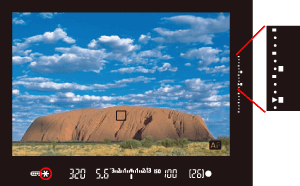
If you want to maintain the AE lock while taking more shots, hold down the <> button and press the shutter button to take another shot.
> button and press the shutter button to take another shot.AE Lock Effects
| Metering Mode | AF Point Selection Method | |
|---|---|---|
| Automatic Selection | Manual Selection | |
 |
AE lock is applied at the AF point that achieved focus. | AE lock is applied at the selected AF point. |


 |
AE lock is applied at the center AF point | |
NOTE
AE lock is not possible with bulb exposures.
In Live View shooting, you can change how long the exposure setting is displayed (AE lock time).
IMPORTANT
The settable functions apply only to Live View shooting. They do not work with viewfinder shooting (settings become invalid).
1. Set the Mode Dial to < P / Tv / Av >.
2. Set the Live View shooting/Movie shooting switch to < >, and press the <
 > button.
>, and press the <> button.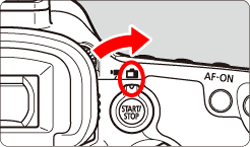
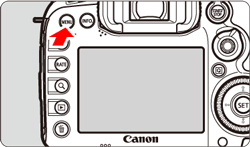
3. Press the <MENU> button to display the menu screen.
4. Press the < > button to select the [
  ] tab.
> button to select the [ ] tab.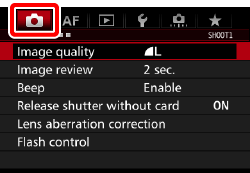
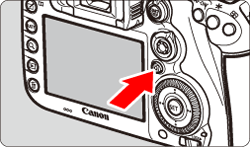
5. Turn the < > dial to select the [
  ] tab.
> dial to select the [ ] tab.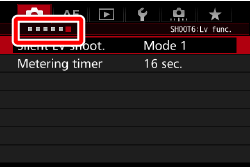

6. Turn the < > dial to select [Metering timer], then press <
 >.
>.
> dial to select [Metering timer], then press <>. 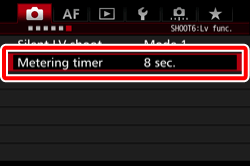
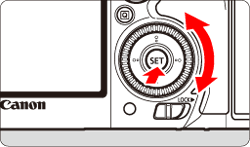
7. Turn the <> dial to select the desired time, then press <>.
> dial to select the desired time, then press <>.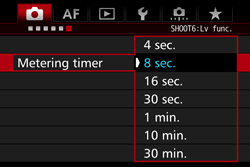
NOTE
Selectable time settings are listed below:
4 sec., 8 sec., 16 sec., 30 sec., 1 min., 10 min., 30 min.
8. Press the shutter button halfway to focus on the subject.
9. Press the <> button.
> button.
The exposure will be locked (AE Lock) for the amount of time specified.
REFERENCE
After applying AE lock during movie shooting, you can cancel it by pressing the < > button. (AE lock setting is retained until you press the <> button.)
> button. (AE lock setting is retained until you press the <> button.)When you customize the controls, you can set AE lock to maintain (hold) a given setting.
The setting procedure is explained below.
1. Set the Mode Dial to < P / Tv / Av >.
2. Press the <MENU> button to display the menu screen.
3. Press the <> button and select the [  ] tab.
> button and select the [ ] tab.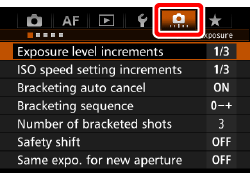
4. Turn the <> dial to select the [  ] tab.
> dial to select the [ ] tab.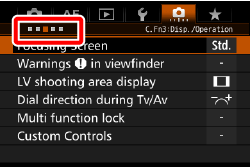
5. Turn the <> dial to select [Custom Controls], then press <>.
> dial to select [Custom Controls], then press <>.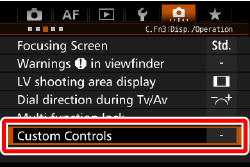
6. Turn the <> dial to select a camera button or dial, then press <>.
> dial to select a camera button or dial, then press <>.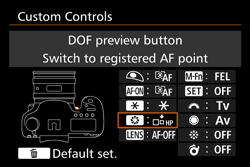
The buttons AE Lock can be assigned to are shown in the table below:
 |  |  |  |  * * |  |  |  |  |  |  |
|---|---|---|---|---|---|---|---|---|---|---|
 | | | | | |
NOTE
You can press the < > button to revert the Custom Control settings to their defaults. Note that the [
  : Custom Controls] settings will not be canceled even if you select [
  : Clear all Custom Func. (C.Fn)].
> button to revert the Custom Control settings to their defaults. Note that the [ : Custom Controls] settings will not be canceled even if you select [ : Clear all Custom Func. (C.Fn)].7. Turn the <> dial to select [  ], then press <>.
> dial to select [ ], then press <>. 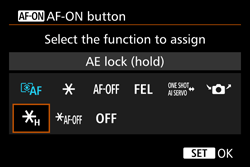
When you press the button assigned to this function, you can lock the exposure (AE lock). The AE lock will be maintained until you press the button again. Convenient when you want to focus and meter the shot at different areas or when you want to take multiple shots at the same exposure setting.
IMPORTANT
If you assign [AE lock (while button pressed)] to the shutter button, any buttons assigned to [AE lock] or [AE lock (hold)] will also work as [AE lock (while button pressed)].