






Differences between the AVCHD/MP4 recording standards and how to set them (VIXIA mini X / LEGRIA mini X)
Solution
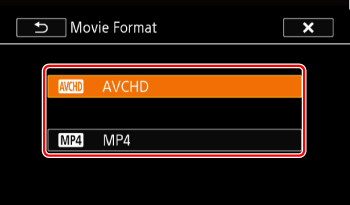
You can choose to record movies in AVCHD or MP4 format.
- AVCHD
AVCHD movies are ideal for copying to an external device such as a Blu-Ray Disc recorder.
- MP4
MP4 movies are versatile and can easily be played back on smartphones or uploaded to the Web.
NOTE
- You can adjust the video quality using the [Movie Format] setting. For information about recording modes, please see Types of recording modes and changing the recording modes (VIXIA mini X / LEGRIA mini X)
- Depending on the device used, you may not be able to play back your recordings on other devices.
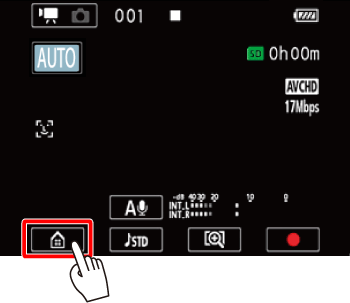
1. Touch [  ].
].
].
2.  Drag your finger left/right to bring the [Other Settings] menu to the center, and then
  touch the icon to open it.
Drag your finger left/right to bring the [Other Settings] menu to the center, and then touch the icon to open it.
3. Drag your finger up/down to bring [Movie Format] to the center, and then touch the button.
Drag your finger up/down to bring [Movie Format] to the center, and then touch the button.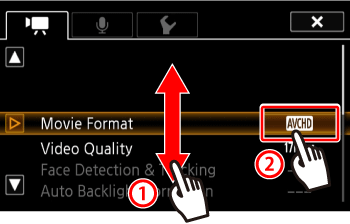
4. Touch the desired option.
5. Touch [  ].
].
].