






Choosing the Subject to Focus On (Tracking AF)
Solution
You can choose the subject you want to focus on and shoot.
IMPORTANT
- The following explanations are provided based on the assumption that the [Shooting Mode] is set to [Program AE] (
 ).
). - [Servo AF] is set to [On].
- The camera may not be able to track the subject if the subject is too small, moves too quickly or if the contrast between the subject and the background is too low.
- [AF-Point Zoom] on the [Shooting] [
 ] tab is not available.
 - Not available in [Macro] (
 ),[Infinity] (
 ).
).
1. Turn the camera on.
2. Press the < > button, choose [AF Frame] on the [Shooting] [ ] tab, and then choose [Tracking AF].
> button, choose [AF Frame] on the [Shooting] [ ] tab, and then choose [Tracking AF].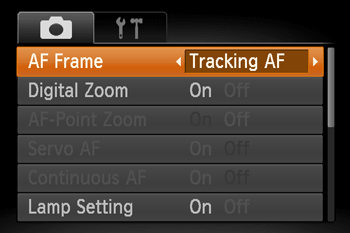
3. Aim the camera so that [  ] is on the desired subject.
] is on the desired subject.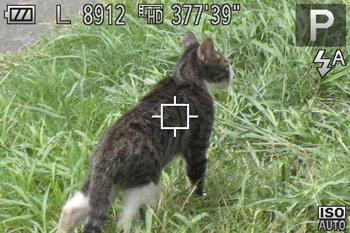
Press the shutter button halfway. [ ] changes to a blue [  ], which follows the subject as the camera continues to adjust the focus and exposure (Servo AF).
] changes to a blue [ ], which follows the subject as the camera continues to adjust the focus and exposure (Servo AF).- If no subject is detected, () is displayed.
) is displayed.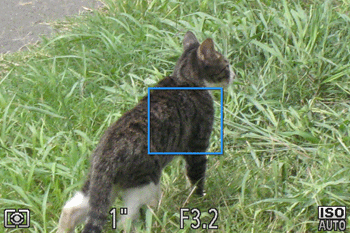
Tracking AF is possible in the following shooting modes.
 ... Tracking AF can be set
| Model | Shooting mode |
 , ,  , ,  , ,  , ,  , ,  , ,  , ,  , ,  , ,  * * | |
| PowerShot ELPH 150 IS / IXUS 155 PowerShot ELPH 140 IS / IXUS 150 PowerShot ELPH 135 / IXUS 145 | |