




Checking the amount of the built-in memory or memory cards that is currently in use
Solution
This section explains the procedure to check the amount of the built-in memory or memory cards that is currently in use.
1. Set the mode switch to <M>.
2. Turn on the camcorder.
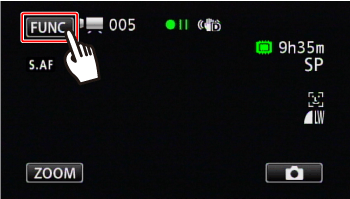
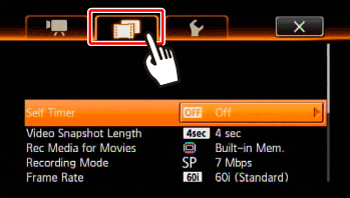
3. Touch [  ].
].
].
4. Touch [ Menu ].

5. Touch [  ].
].
].
6.  Drag your finger up and down bring [Memory Info] into the orange selection bar,
  and touch inside the frame on the right.
Drag your finger up and down bring [Memory Info] into the orange selection bar, and touch inside the frame on the right.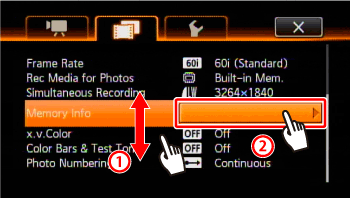
7. Touch [  ] (built-in memory), [
  ] (memory card A) or [
  ] (memory card B).
] (built-in memory), [ ] (memory card A) or [ ] (memory card B).
8. Check the memory information, such as the total space.
The following screen appears when you select [Card A].
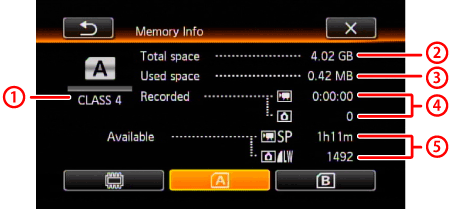 SD Speed Class Total space
 Used space
 Total recording time / total number of photos
 Available recording time / number of available photos
NOTE
- The values are calculated based on the video mode and size of photos(1920×1080) currently set.
- The [Total space] shown for the built-in memory indicates actually usable space. It may be slightly smaller than the nominal built-in memory capacity listed in the specifications.