






Images are not displayed on the LCD monitor and in the viewfinder
Solution
Press the <DISP.> button ( ) on the camera to change the display mode of the [LCD Monitor].
) on the camera to change the display mode of the [LCD Monitor].Each time you press the <DISP.> () button on the camera, the display mode will be changed as follows.
) button on the camera, the display mode will be changed as follows.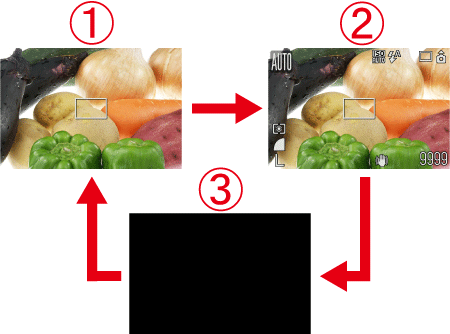
 No Information
 Information View
 Off
OffThe Power Saving Function of the camera may be in operation.
If you do not operate the camera for a certain time, the [LCD Monitor] and the power of the camera will turn off automatically.
For details on changing the Power Saving Function settings, please go to the following link.
If images are not displayed on the LCD monitor or in the viewfinder even after you have performed the above procedures, your camera may be malfunctioning. Please contact the service centers.