






Setting the AF frame (Set the AF frame to Face Detect)
Solution
When you set [AF Frame] to [Face AiAF], the camera will recognize the face of the subject, and the [AF Frame] will start to follow the targeted face. This setting is useful when shooting portraits because the face can be easily brought into focus.
This section explains the process of setting [AF Frame] to [Face AiAF].
CAUTION
- The following explanations are provided based on the assumption that the [Shooting Mode] is set to [Program AE] (
 ).
). - When the [Shooting Mode] is set to [Auto] (
 ) [AF Frame] will automatically be set to [Face AiAF], so the following procedures are not required.
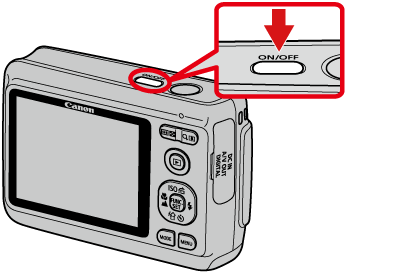
1. Press the <Power> button on the camera.
NOTE
To set [AF Frame] to [Face AiAF], it is required to preset the [Shooting Mode] to one of the following settings.
- [Program AE] (), [SCN] ( )*
)*
), [SCN] ()** The above settings cannot be made if the camera is in the [Fireworks] ( ) mode.
) mode.2. Press the <MENU> ( ) button.
) button.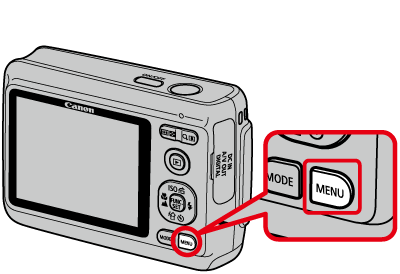
3. The following screen appears.
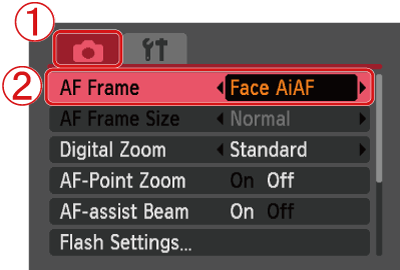
 Operate the <directional buttons> to select the [Shooting] (
 ) tab.
 Operate the <directional buttons> to set [AF Frame] to [Face AiAF].
After the settings are completed, press the <MENU> () button.
) button.When [Face AiAF] is set, the [AF Frame] will start to follow the targeted face.

With this setting, you can easily bring the face into focus and prevent the subject from becoming out of focus during shooting.