




Selecting the Memory for the Recordings
Solution
You can select to record your movies and photos in the built-in memory or on a memory card. The built-in memory is the default memory for recording both.
1. Set the Camera mode dial to <  > or <
  > . Turn on the camcorder.
> or < > . Turn on the camcorder.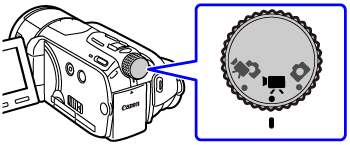
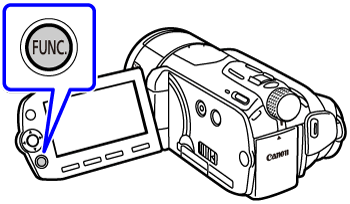
2. Press <  > .
> .
> .
3. Select the [  Menu ] icon and press <
  > to open the setup menus.
Menu ] icon and press < > to open the setup menus.
4. To change the media for recording movies or photos.
4-1. Select the [  ] .
] .
] .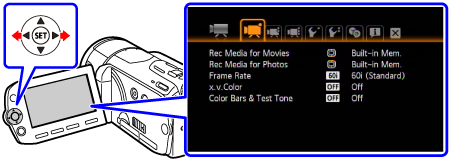
4-2. Select the [Rec Media for Movies] or [Rec Media for Photos] and press < >.
>.
4-3.Select the built-in memory or memory card* and press < >.
>.* When selecting the memory, you can check the total, used and approximate available recording time/number of photos (estimated based on the recording mode (movies) or photo size/quality (photos) currently in use).

5. Press < > to save the settings and close the menu.
> to save the settings and close the menu.