






Connecting your camera to a TV
Connecting your camera to a TV
If you connect your camera to a TV, you can display images of the camera’s LCD monitor on the TV screen.
|
Cautions:
|
||
|
|
-
|
The location of the camera’s terminal may differ according to the model.
|
|
|
-
|
When using [Stitch Assist] (for panoramic images), the images cannot be displayed on a TV screen.
|
1. Turn off the camera and the TV.
2. Connect the [AV Cable] that is bundled with the camera to the camera’s [A/V OUT] terminal.
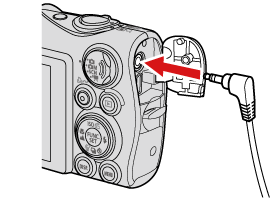
3. Plug the other ends of the [AV Cable] into the VIDEO IN and AUDIO IN jacks on the TV.
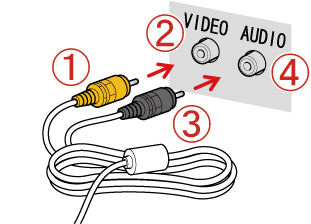
Plug the  yellow terminal of the [AV Cable] into the
  VIDEO IN jack on the TV.
Plug the black terminal of the [AV Cable] into the
  AUDIO IN jack on the TV. If the TV has two AUDIO IN jacks (for right and left), plug the AV Cable to either one of them.
yellow terminal of the [AV Cable] into the VIDEO IN jack on the TV.Plug the
black terminal of the [AV Cable] into the AUDIO IN jack on the TV. If the TV has two AUDIO IN jacks (for right and left), plug the AV Cable to either one of them.4. Turn on the TV and switch it to video mode.
5. Turn on the camera, and the images on the camera’s LCD monitor will appear on the TV screen.
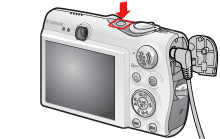
This completes the process of connecting your camera to a TV.